Avatar

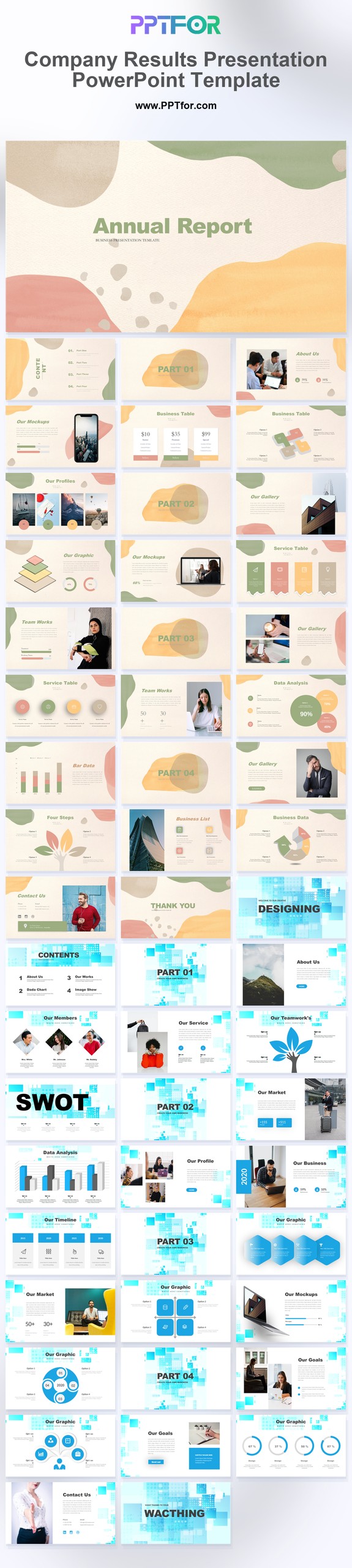
Company Results Presentation PowerPoint Template

by pptfor in Business & Corporate

Company Results Presentation PowerPoint Template

Company Results Presentation PowerPoint Template for reporting business performance decks in PowerPoint, Google Slides, and Keynote.

Company Results Presentation PowerPoint Template gives teams a cleaner way to present performance updates, KPI summary layouts, SWOT findings, and company report content in one structured deck. The clean corporate style and blue-and-white palette suit executive reporting, business review meetings, and formal stakeholder communication where numbers and conclusions need to feel organized rather than crowded. Template compatibility includes Microsoft PowerPoint, Google Slides, and Apple Keynote, while drag-and-drop placeholders and editable vector-based slides make it easier to adapt content for your own reporting cycle. Use this deck to present company results with sharper structure and faster turnaround.

  • Compatibility: Microsoft PowerPoint, Google Slides, Apple Keynote
  • Aspect Ratio: 16:9 widescreen
  • Graphics: 100% Vector Graphics
  • Placeholders: Drag-and-Drop Placeholders
  • Editability: Fully customizable slides, colors, fonts, and layouts
  • Slide Count: 34 slides

What You Can Use This Company Results Presentation PowerPoint Template For

  • Executive teams reviewing company performance – summarize KPIs, reporting highlights, and business direction in a deck that is easier to scan during leadership meetings.
  • Marketing analytics managers presenting monthly or quarterly results – organize campaign outcomes, performance trends, and SWOT findings with better structure for stakeholder discussion.
  • Department heads preparing formal business updates – present team progress, operational results, and next-step priorities in a format that feels more decision-ready.
  • Consultants delivering company report presentations – turn performance commentary and business findings into a clearer executive summary for client reviews.
  • Board presenters leading structured reporting sessions – connect KPI summaries, business risks, and strategic actions in a layout that supports more focused discussion.
  • Operations leaders documenting business outcomes – explain progress, issues, and follow-up actions with cleaner section dividers and more consistent reporting flow.
  • Internal teams aligning on business priorities – use a more organized reporting deck to move from raw results into clear decisions and next actions.

Frequently Asked Questions

What is this Company Results Presentation PowerPoint Template commonly used for?

It is commonly used for business performance reporting, KPI review meetings, executive updates, and company report presentations that need a more structured slide format.

Can I customize this template for my own reporting cycle and branding?

Yes. Slides are fully editable, so you can update colors, text, KPI sections, SWOT content, and layout details for your own company presentation.

Does this template work with PowerPoint, Google Slides, and Keynote?

It works with Microsoft PowerPoint, Google Slides, and Apple Keynote, which makes collaboration easier across different reporting and presentation workflows.

How does this template save time when preparing results presentations?

It saves time by giving teams a ready-made structure for company reporting, which reduces formatting work and makes it faster to organize metrics, findings, and recommendations.

Write a Review


Post a Comment

$15

$

  • Price is in US dollars and excludes tax
  • Size:16x9
  • PowerPoint MacOffice 365 Google Slides
  • 100% editable
  • What you see is what you get
  • This is a secure SSL encrypted payment. Credit Card Certificate
Avatar
pptfor Joined: April 2026
Item Rating:
This item no rated yet.

Get all products for only $29!

Get full access to our entire collection of premium PPT templates for one simple price.
Forget about complex tools or technical skills—just choose, edit, and download.