Avatar

Vibrant Creative Quarterly Report PowerPoint Template

by PPTFOR Editorial Team in Business & Corporate

Vibrant Creative Quarterly Report PowerPoint Template

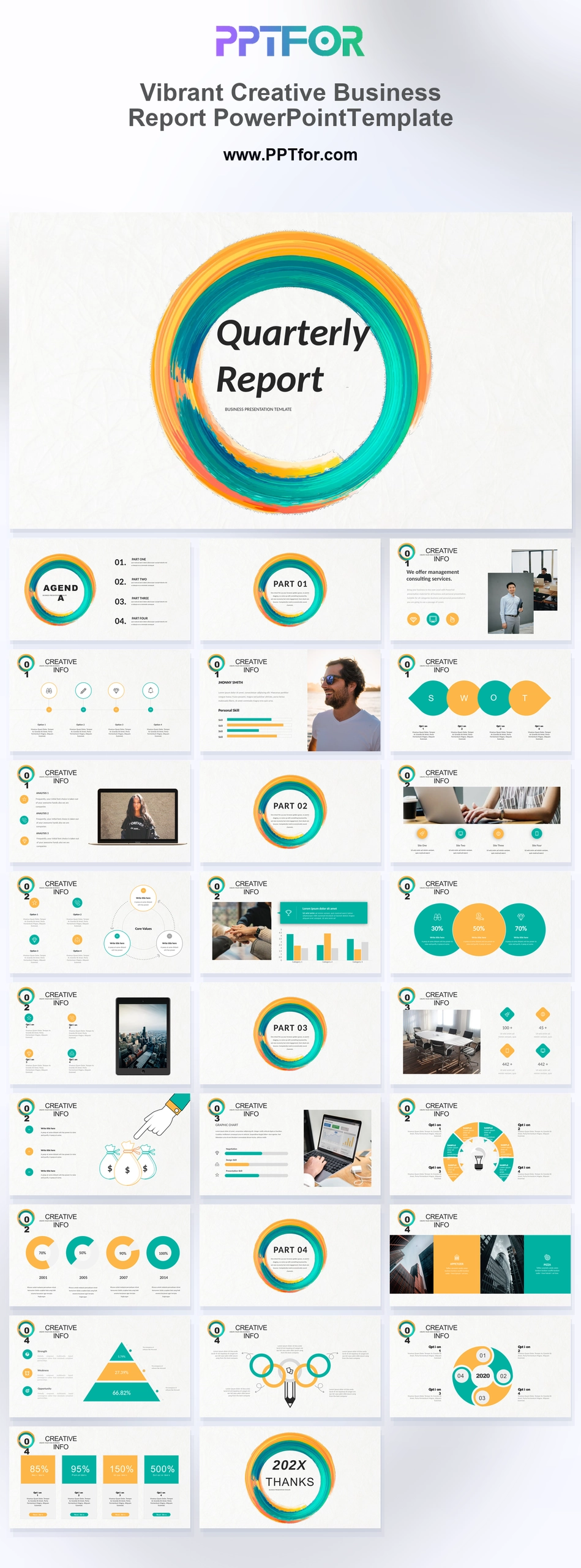
The Vibrant Creative Quarterly Report PowerPoint Template offers 27 slides for a quarterly business review. Comparison, progress, financial, SWOT, and milestone layouts help connect results from the quarter with the next period’s priorities.

Visual elements include artistic brush rings, acrylic strokes, circle accents, editorial typography, and white-space frames.

  • Compatibility: Microsoft PowerPoint. Check fonts, charts, and image placement after importing into Google Slides or Keynote.
  • Aspect Ratio: 16:9 widescreen
  • Graphics: Editable vector graphics
  • Placeholders: Drag-and-Drop Placeholders
  • Editability: Editable text, colors, fonts, and layouts
  • Slide Count: 27 slides

Suggested Uses and Presentation Tasks

  • Creative directors presenting performance reviews – use textured brush rings, big-number metrics, and progress bars to make results feel more distinctive.
  • Strategy managers building marketing reports – organize SWOT analysis, comparison rings, and milestone flowcharts into a clearer strategic review.
  • Account executives preparing agency proposals – present feature grids, portfolio sections, and financial layouts in a more client-facing deck.
  • Studio owners showcasing creative portfolios – combine editorial typography, white-space frames, and device mockups to highlight visual work with structure.
  • Freelance designers pitching launch decks – use colorful brush accents, pyramid graphs, and brainstorming diagrams to frame product ideas with energy.
  • Marketing studios reporting campaign progress – turn data bars, money bag financial grids, and metric showcases into easier stakeholder updates.
  • Media production teams presenting project results – use artistic section dividers, laptop showcases, and textured closing slides for a stronger visual finish.

Frequently Asked Questions

When should I choose this template?

Choose this deck for a quarterly review that combines numerical results with team or project updates. Use consistent definitions when comparing quarters and explain seasonality before interpreting a change.

What should I prepare before editing?

Prepare actuals, targets, previous-quarter figures, completed milestones, and action owners. Label year-to-date figures separately from quarterly totals and specify the dates of the reporting period.

What layouts are included in this 27-slide business report deck?

The deck includes an artistic report cover, agenda, ring section dividers, feature grid, profile and skill bars, SWOT matrix, laptop showcase, comparison rings, progress bars, tablet mockup, financial grid, pyramid graph, brainstorming diagram, milestone flowchart, metric showcase, and closing slide.

How can I edit the template?

Edit the text, colors, and slide elements to match your presentation. Before updating a graphic, check whether it is a native chart, a grouped shape, or an image; the editing method differs.



Post a Comment

$15

$

  • Price is in US dollars and excludes tax
  • Size:16x9
  • Microsoft PowerPoint, Google Slides, Apple Keynote, PowerPoint for Mac / Office 365, WPS Office
  • 100% editable
  • What you see is what you get
  • This is a secure SSL encrypted payment. Credit Card Certificate

Get all products for only $29!

Get full access to our entire collection of premium PPT templates for one simple price.
Forget about complex tools or technical skills—just choose, edit, and download.