Avatar

Creative Watercolor Splash Annual Report Template 27 slides

by PPTFOR Editorial Team in Business & Corporate

Creative Watercolor Splash Annual Report Template 27 slides

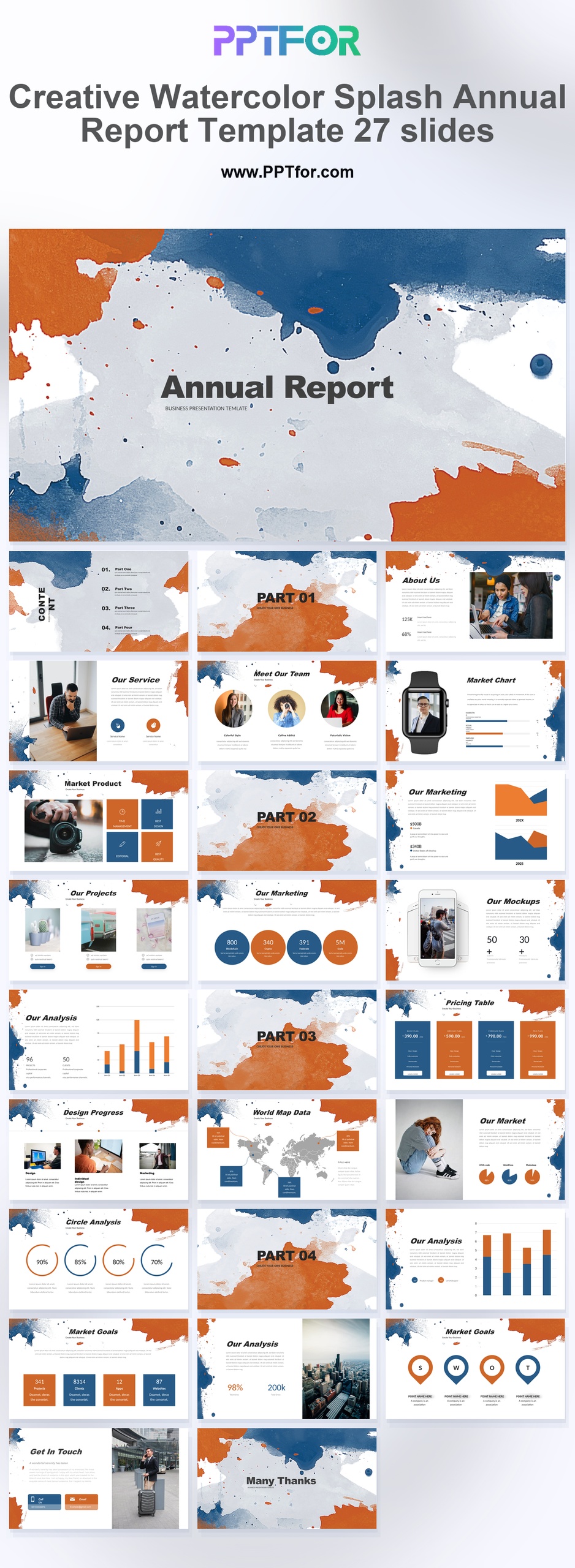
The Creative Watercolor Splash Annual Report Template provides 27 slides with watercolor artwork, team pages, marketing charts, and SWOT layouts. Use it for an annual review where creative projects and business performance share the agenda.

Visual elements include artistic ink splashes, watercolor textures, distressed brush strokes, bold block headers, and clean data infographics.

  • Compatibility: Microsoft PowerPoint. Check fonts, charts, and image placement after importing into Google Slides or Keynote.
  • Aspect Ratio: 16:9 widescreen
  • Graphics: Editable vector graphics
  • Placeholders: Drag-and-Drop Placeholders
  • Editability: Editable text, colors, fonts, and layouts
  • Slide Count: 27 slides

Suggested Uses and Presentation Tasks

  • Creative directors presenting annual business reviews – use watercolor textures, bold block headers, and data infographics to make yearly results feel more distinctive.
  • Marketing managers building strategy reports – combine marketing charts, SWOT analysis, pricing tables, and world map data into a more expressive reporting flow.
  • Architects preparing creative project proposals – present design progress, service pages, team context, and project direction with an artistic structure that fits visual work.
  • Agency owners showcasing brand identity work – connect About Us content, team sections, mockups, and portfolio-style storytelling with hand-crafted watercolor elements.
  • Design studios reviewing client campaigns – use clean data infographics and marketing charts to explain performance indicators without losing the deck’s creative texture.
  • Brand teams creating presentation narratives – organize contents, part transitions, services, and visual examples into a deck that supports design consistency.
  • Consultants packaging creative business findings – turn annual review content, pricing logic, and strategic recommendations into a more memorable client-facing presentation.

Frequently Asked Questions

When should I choose this template?

Choose this watercolor style for a creative organization whose report includes visual work. Keep chart backgrounds quiet and ensure the decorative artwork does not obscure labels or source notes.

What should I prepare before editing?

Collect annual figures, selected project images, team information, and strategic findings. Replace sample text and verify that any image used in the report is approved for the intended audience.

What layouts and visual sections are included in this deck?

The deck includes an annual report cover, contents outline, part transitions, About Us, service pages, team section, smart watch and mobile mockups, marketing charts, pricing table, design progress, world map data, and SWOT analysis.

How can I edit the template?

Edit the text, colors, and slide elements to match your presentation. Before updating a graphic, check whether it is a native chart, a grouped shape, or an image; the editing method differs.



Post a Comment

$15

$

  • Price is in US dollars and excludes tax
  • Size:16x9
  • Microsoft PowerPoint, Google Slides, Apple Keynote, PowerPoint for Mac / Office 365, WPS Office
  • 100% editable
  • What you see is what you get
  • This is a secure SSL encrypted payment. Credit Card Certificate

Get all products for only $29!

Get full access to our entire collection of premium PPT templates for one simple price.
Forget about complex tools or technical skills—just choose, edit, and download.