Avatar

Performance Analysis PowerPoint Template 28 Slides

by PPTFOR Editorial Team in Data & Analytics Reports

Performance Analysis PowerPoint Template 28 Slides

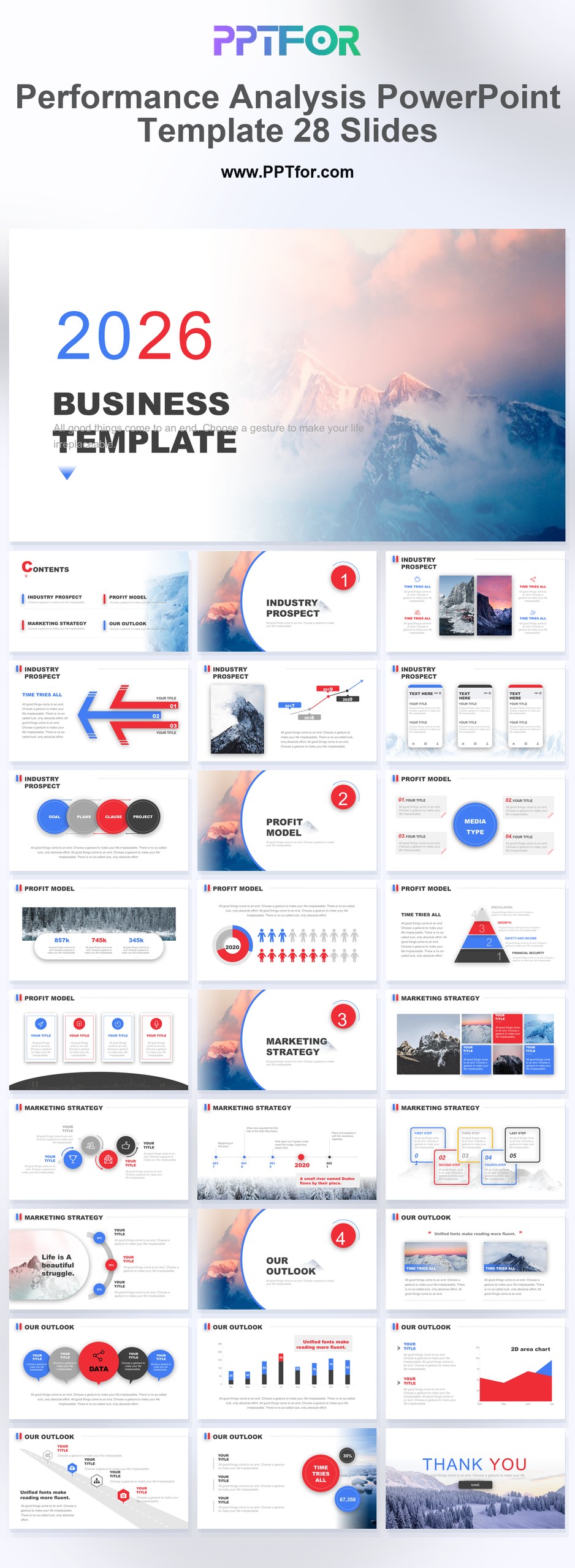
The Performance Analysis PowerPoint Template provides 28 slides for explaining results against a baseline or target. Its red, blue, and white charts support discussions of what changed, why it changed, and what action follows.

  • Compatibility: Microsoft PowerPoint. Check fonts, charts, and image placement after importing into Google Slides or Keynote.
  • Aspect Ratio: 16:9 widescreen
  • Graphics: Editable vector graphics
  • Placeholders: Drag-and-Drop Placeholders
  • Editability: Editable text, colors, fonts, and layouts
  • Slide Count: 28 slides

Suggested Content to Add

  • Research question – state the business decision or problem the analysis addresses.
  • Scope and sources – define the population, period, geography, and datasets used.
  • Key findings – give each major result a chart or other supporting evidence.
  • Comparisons – use equivalent periods, units, and category definitions.
  • Interpretation – explain what the results suggest and separate inference from observation.
  • Limitations – identify missing data, small samples, or assumptions affecting the conclusion.
  • Recommended action – connect the proposed decision to a finding and an expected outcome.

Frequently Asked Questions

When should I choose this template?

Choose this deck for a performance review where the comparison matters as much as the headline number. Use a consistent definition of improvement and explain changes in the measurement method.

What should I prepare before editing?

Bring actuals, targets, the comparison period, and supporting explanations for variances. Separate one-off events from recurring trends before proposing a corrective action.

What visible design elements are included in this template?

This template supports business analysis with visible data visualization, business charts, and infographic-style layouts. The red, blue, and white color system provides contrasting accents for performance reporting.

How can I edit the template?

Edit the text, colors, and slide elements to match your presentation. Before updating a graphic, check whether it is a native chart, a grouped shape, or an image; the editing method differs.



Post a Comment

$15

$

  • Price is in US dollars and excludes tax
  • Size:16x9
  • Microsoft PowerPoint, Google Slides, Apple Keynote, PowerPoint for Mac / Office 365, WPS Office
  • 100% editable
  • What you see is what you get
  • This is a secure SSL encrypted payment. Credit Card Certificate

Get all products for only $29!

Get full access to our entire collection of premium PPT templates for one simple price.
Forget about complex tools or technical skills—just choose, edit, and download.