Avatar

Event Planning PowerPoint Template

by PPTFOR Editorial Team in Marketing & Sales

Event Planning PowerPoint Template

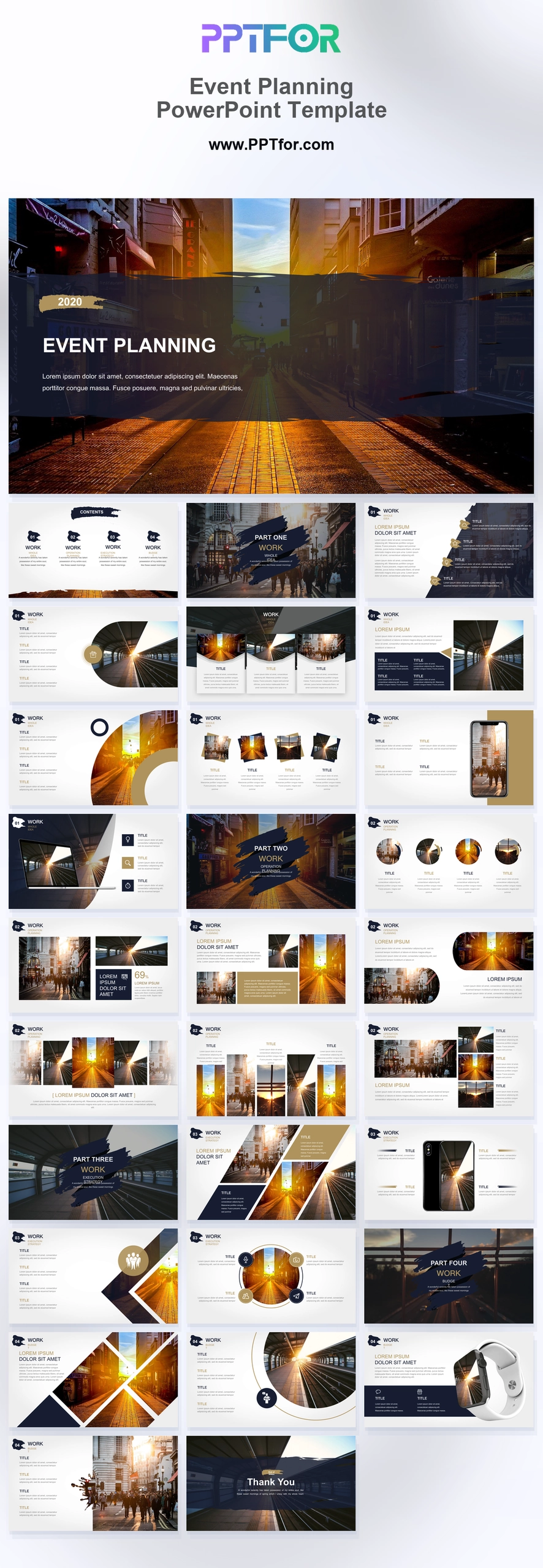
The Event Planning PowerPoint Template provides 30 layouts for an event proposal and delivery plan. Project context, image grids, speaker spotlights, showcase layouts, and an operational timeline help explain the event and its schedule.

Visual elements include distressed dark brush strokes, golden amber sunset cityscapes, sharp diagonal split layouts, circular image masks, high-contrast white content frames, and synchronized dual-device interface mockups.

  • Compatibility: Microsoft PowerPoint. Check fonts, charts, and image placement after importing into Google Slides or Keynote.
  • Aspect Ratio: 16:9 widescreen
  • Graphics: Editable vector graphics
  • Placeholders: Drag-and-Drop Placeholders
  • Editability: Editable text, colors, fonts, and layouts
  • Slide Count: 30 slides

Suggested Uses and Presentation Tasks

  • Event planner building an event management proposal – organize venue concept, guest experience, schedule, and delivery scope into a client-ready storyline.
  • PR director pitching a launch campaign – connect media moments, brand awareness goals, and experiential activation details with stronger executive context.
  • Creative coordinator presenting production direction – use textured section dividers and urban showcase layouts to frame mood, pacing, and visual references.
  • Marketing manager reviewing event ROI logic – explain audience targeting, campaign optimization, and follow-up actions without crowding the slide canvas.
  • Agency owner selling a luxury brand launch – pair amber cityscape visuals with high-contrast content frames to position the concept with the scope and schedule of the proposed event.
  • Hospitality team showcasing a venue portfolio – present property highlights, image galleries, and operational schedule details in a visual sequence.
  • Real estate marketer preparing an activation pitch – turn location narrative, architectural perspective, and market penetration goals into a concise deck flow.
  • Production studio outlining a client event plan – align creative concept, device mockups, timeline schedule, and project gallery assets before approval meetings.

Frequently Asked Questions

When should I choose this template?

Choose this deck when stakeholders need to evaluate the event concept alongside practical delivery. Use the timeline for approvals and operational milestones, not only the agenda attendees will see.

What should I prepare before editing?

Prepare the audience, venue assumptions, speaker information, budget, and delivery schedule. Mark unconfirmed bookings and identify who approves each decision before the event can proceed.

What slide structures are included in this event planning presentation?

The deck includes 30 layouts such as a cinematic cover, grid contents, textured section dividers, project backgrounder, image grids, circular speaker spotlights, urban showcase banner, device mockups, diagonal portfolio matrix, operational timeline schedule, and thank you outro.

How can I edit the template?

Edit the text, colors, and slide elements to match your presentation. Before updating a graphic, check whether it is a native chart, a grouped shape, or an image; the editing method differs.



Post a Comment

$15

$

  • Price is in US dollars and excludes tax
  • Size:16x9
  • Microsoft PowerPoint, Google Slides, Apple Keynote, PowerPoint for Mac / Office 365, WPS Office
  • 100% editable
  • What you see is what you get
  • This is a secure SSL encrypted payment. Credit Card Certificate

Get all products for only $29!

Get full access to our entire collection of premium PPT templates for one simple price.
Forget about complex tools or technical skills—just choose, edit, and download.