Avatar

Event Planning PowerPoint Template

by PPTFOR Editorial Team in Startup & Pitch Decks

Event Planning PowerPoint Template

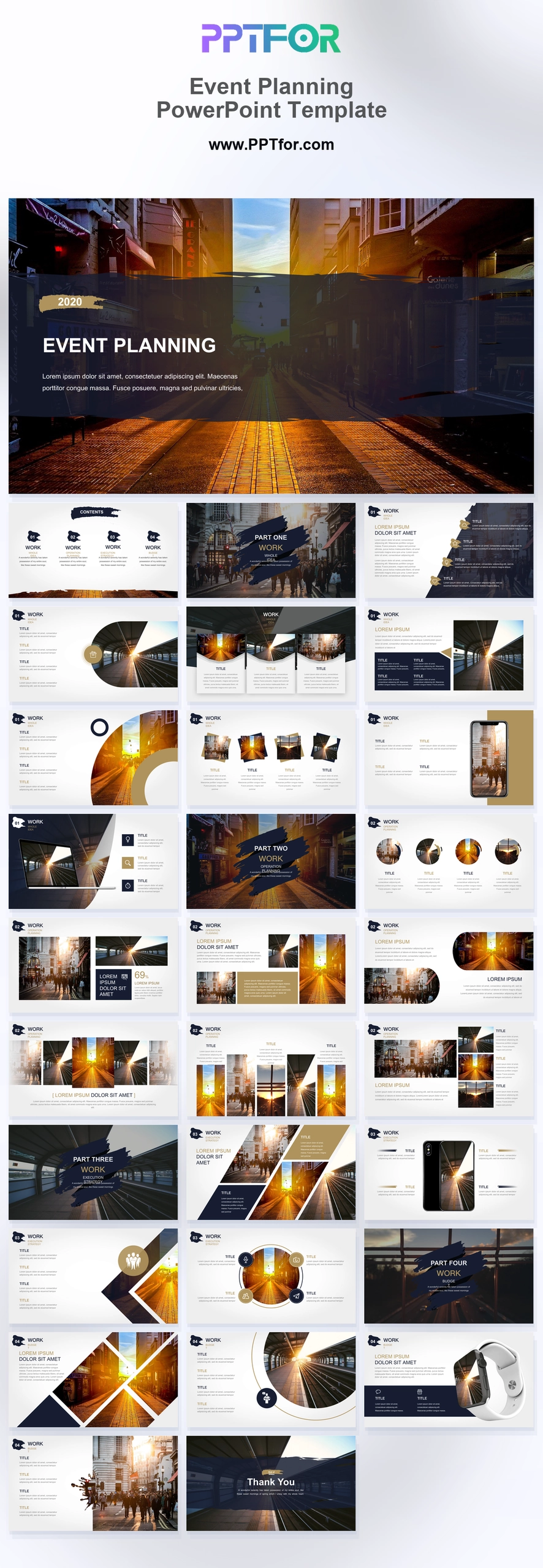
Plan event proposals and PR launch campaigns with this Event Planning PowerPoint Template, built for editable, image-led pitch decks.

The Event Planning PowerPoint Template gives event planners, PR directors, creative coordinators, marketing managers, and agency owners a cinematic structure for proposals, PR marketing campaigns, experiential activation pitches, luxury brand launch decks, and venue portfolios. Distressed dark brush strokes, golden amber sunset cityscapes, sharp diagonal split layouts, circular image masks, high-contrast white content frames, and synchronized dual-device interface mockups create an urban cinematic style with enough discipline for client review. This event planning deck gives hospitality, real estate marketing, and creative production teams a structured way to present venue concepts, schedule logic, portfolio proof, and campaign optimization. Template compatibility includes Microsoft PowerPoint, Google Slides, Apple Keynote, PowerPoint for Mac / Office 365, and WPS Office, and the slides, colors, fonts, layouts, vector geometry, and image placeholders are fully editable. Download this event planning template and turn a complex event concept into a client-ready pitch today.

  • Compatibility: Microsoft PowerPoint, Google Slides, Apple Keynote, PowerPoint for Mac / Office 365, WPS Office
  • Aspect Ratio: 16:9 widescreen
  • Graphics: 100% Vector Graphics
  • Placeholders: Drag-and-Drop Placeholders
  • Editability: Fully customizable slides, colors, fonts, and layouts
  • Slide Count: 30 slides

What You Can Use This Event Planning PowerPoint Template For

  • Event planner building an event management proposal – organize venue concept, guest experience, schedule, and delivery scope into a client-ready storyline.
  • PR director pitching a launch campaign – connect media moments, brand awareness goals, and experiential activation details with stronger executive context.
  • Creative coordinator presenting production direction – use textured section dividers and urban showcase layouts to frame mood, pacing, and visual references.
  • Marketing manager reviewing event ROI logic – explain audience targeting, campaign optimization, and follow-up actions without crowding the slide canvas.
  • Agency owner selling a luxury brand launch – pair amber cityscape visuals with high-contrast content frames to position the concept with premium restraint.
  • Hospitality team showcasing a venue portfolio – present property highlights, image galleries, and operational schedule details in a polished visual sequence.
  • Real estate marketer preparing an activation pitch – turn location narrative, architectural perspective, and market penetration goals into a concise deck flow.
  • Production studio outlining a client event plan – align creative concept, device mockups, timeline schedule, and project gallery assets before approval meetings.

Frequently Asked Questions

What is the Event Planning PowerPoint Template best used for?

This template is best used for event management proposals, PR marketing campaigns, experiential activation pitches, luxury brand launch decks, and venue or hospitality portfolios where teams need a cinematic visual system and structured proposal flow.

Which client scenario fits this event planning deck best?

It fits client-facing pitch meetings where an event planner, PR director, or agency owner must sell a launch concept, venue story, schedule, and campaign optimization plan without rebuilding the presentation from scratch.

What slide structures are included in this event planning presentation?

The deck includes 30 layouts such as a cinematic cover, grid contents, textured section dividers, project backgrounder, image grids, circular speaker spotlights, urban showcase banner, device mockups, diagonal portfolio matrix, operational timeline schedule, and thank you outro.

Can I customize this deck for my agency, venue, or brand launch?

Yes. This deck supports Microsoft PowerPoint, Google Slides, Apple Keynote, PowerPoint for Mac / Office 365, and WPS Office. Teams can edit slides, colors, fonts, layouts, vector geometry, and drag-and-drop image placeholders.


Post a Comment

$15

$

  • Price is in US dollars and excludes tax
  • Size:16x9
  • Microsoft PowerPoint, Google Slides, Apple Keynote, PowerPoint for Mac / Office 365, WPS Office
  • 100% editable
  • What you see is what you get
  • This is a secure SSL encrypted payment. Credit Card Certificate

Get all products for only $29!

Get full access to our entire collection of premium PPT templates for one simple price.
Forget about complex tools or technical skills—just choose, edit, and download.