Avatar

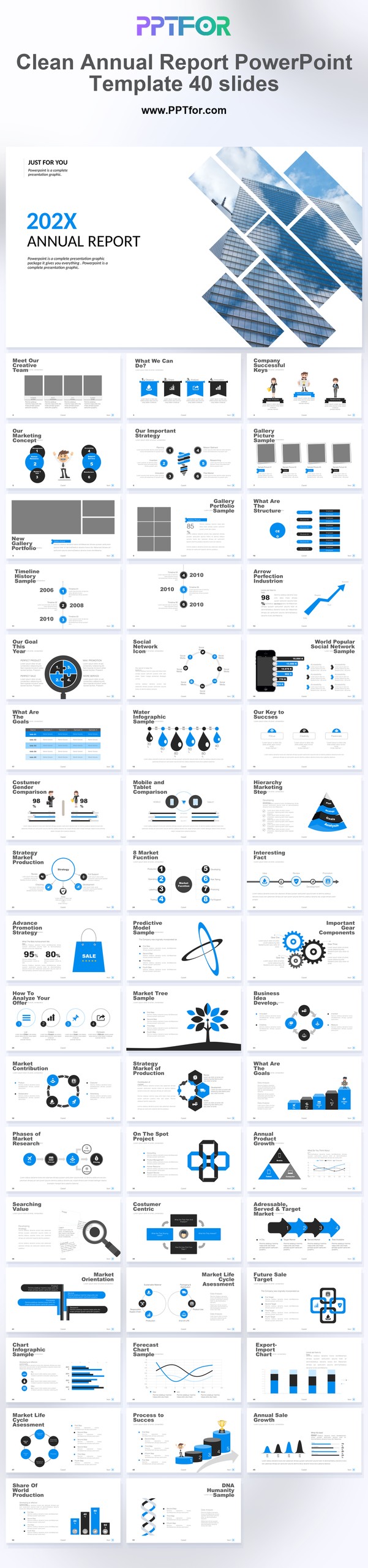
Clean Annual Report PowerPoint Template 40 Slides

by PPTFOR Editorial Team in Data & Analytics Reports

Clean Annual Report PowerPoint Template 40 Slides

The Clean Annual Report PowerPoint Template provides 40 slides for year-end reporting. Use its minimal style to present annual results, explain changes from the previous year, and set out priorities for the next reporting cycle.

  • Compatibility: Microsoft PowerPoint. Check fonts, charts, and image placement after importing into Google Slides or Keynote.
  • Aspect Ratio: 16:9 widescreen
  • Graphics: Editable vector graphics
  • Placeholders: Drag-and-Drop Placeholders
  • Editability: Editable text, colors, fonts, and layouts
  • Slide Count: 40 slides

Suggested Content to Add

  • Year in review – state the reporting year and summarize the most significant results.
  • Financial performance – compare like-for-like annual figures and identify preliminary numbers.
  • Operational results – use consistent measures for delivery, customers, or service activity.
  • Major milestones – show completed projects with dates and documented outcomes.
  • People and capability – connect team developments to the work delivered during the year.
  • Risks and lessons – explain material setbacks and the response taken.
  • Next-year priorities – separate future targets from results already achieved.

Frequently Asked Questions

How can I edit the template?

Edit the text, colors, and slide elements to match your presentation. Before updating a graphic, check whether it is a native chart, a grouped shape, or an image; the editing method differs.

What should I check when importing into other presentation software?

Use PowerPoint for the PPTX workflow. If you import the file into Google Slides or Keynote, review fonts, chart labels, image crops, and spacing before presenting. Imported layouts may need adjustment.

When should I choose this template?

Choose this 40-slide report when stakeholders need both a concise overview and supporting detail. Separate financial and operating results, and retain the same reporting definitions throughout the deck.

What should I prepare before editing?

Gather finalized annual figures, prior-year comparisons, significant milestones, and management commentary. Clearly mark preliminary figures and forecasts, and identify the source of each headline result.



Post a Comment

$15

$

  • Price is in US dollars and excludes tax
  • Size:16x9
  • Microsoft PowerPoint, Google Slides, Apple Keynote, PowerPoint for Mac / Office 365, WPS Office
  • 100% editable
  • What you see is what you get
  • This is a secure SSL encrypted payment. Credit Card Certificate

Get all products for only $29!

Get full access to our entire collection of premium PPT templates for one simple price.
Forget about complex tools or technical skills—just choose, edit, and download.