Avatar

Clean Blue Corporate Business Report PowerPoint Template

by PPTFOR Editorial Team in Business & Corporate

Clean Blue Corporate Business Report PowerPoint Template

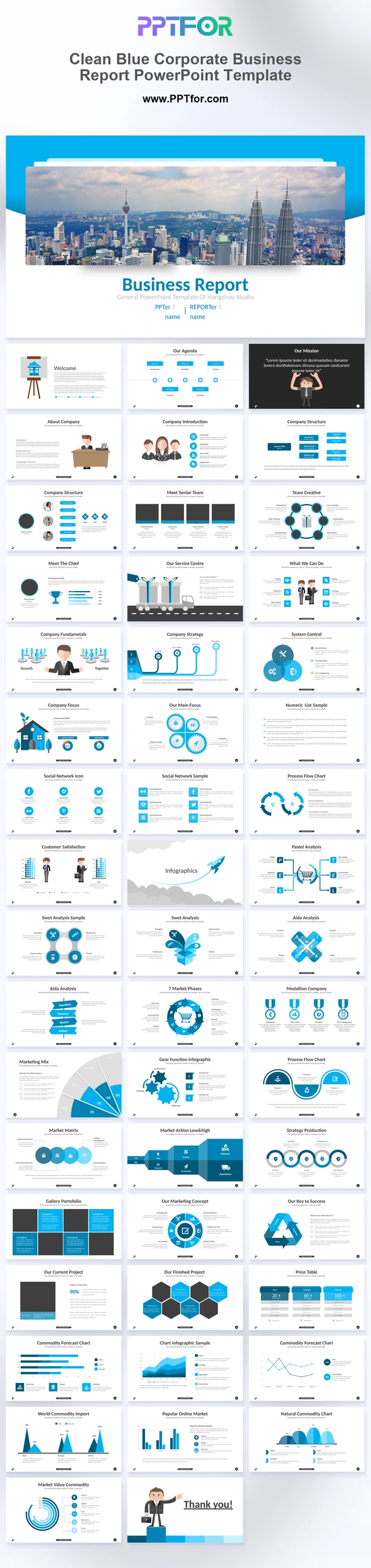
The Clean Blue Corporate Business Report PowerPoint Template provides 49 slides for a detailed business review. Company, organization, workflow, funnel, SWOT, Gantt, and market-chart layouts connect results with the processes and teams responsible.

Visual elements include a city skyline cover, flat vector corporate characters, sky blue geometric accents, data dashboards, text-heavy analytical layouts, and white canvas backgrounds.

  • Compatibility: Microsoft PowerPoint. Check fonts, charts, and image placement after importing into Google Slides or Keynote.
  • Aspect Ratio: 16:9 widescreen
  • Graphics: Editable vector graphics
  • Placeholders: Drag-and-Drop Placeholders
  • Editability: Editable text, colors, fonts, and layouts
  • Slide Count: 49 slides

Suggested Uses and Presentation Tasks

  • General managers building company profiles – present company overview, mission, teams, and service structure with an organized corporate report flow.
  • Operations leads summarizing business performance – use dashboards, Gantt timelines, and process flowcharts to explain operations updates more clearly.
  • HR specialists leading onboarding sessions – introduce org structures, executive teams, training content, and internal workflows with character-led business slides.
  • Account executives preparing client proposals – combine service delivery nodes, pricing tables, and strategy blocks to communicate value in a structured format.
  • Business coordinators managing project workflow pitches – turn timelines, funnels, and matrix blocks into easier planning slides for cross-functional teams.
  • Financial services teams reviewing annual reports – use data dashboards, market bar charts, and comparison layouts to support executive decision meetings.
  • Education and training teams explaining business processes – use flat icons, character graphics, and spacious text grids to make complex topics easier to follow.

Frequently Asked Questions

When should I choose this template?

Choose this report when a management review needs organizational and operational context alongside performance figures. Use a short executive sequence and keep detailed process material available for discussion.

What should I prepare before editing?

Prepare the reporting period, department results, process owners, milestone status, and comparison figures. Reconcile data definitions across teams before presenting company-level conclusions.

What layouts are included in this 49-slide business report deck?

The deck includes a skyline cover, strategic agenda, mission slide, company profile, org structure, executive portfolio, logistics node, flowcharts, funnel analytics, SWOT blocks, Gantt timelines, market bar charts, price tables, and character outro slide.

How can I edit the template?

Edit the text, colors, and slide elements to match your presentation. Before updating a graphic, check whether it is a native chart, a grouped shape, or an image; the editing method differs.



Post a Comment

$15

$

  • Price is in US dollars and excludes tax
  • Size:16x9
  • Microsoft PowerPoint, Google Slides, Apple Keynote, PowerPoint for Mac / Office 365, WPS Office
  • 100% editable
  • What you see is what you get
  • This is a secure SSL encrypted payment. Credit Card Certificate

Get all products for only $29!

Get full access to our entire collection of premium PPT templates for one simple price.
Forget about complex tools or technical skills—just choose, edit, and download.