Avatar

Vibrant Layers Geometric Business PowerPoint Template

by PPTFOR Editorial Team in Business & Corporate

Vibrant Layers Geometric Business PowerPoint Template

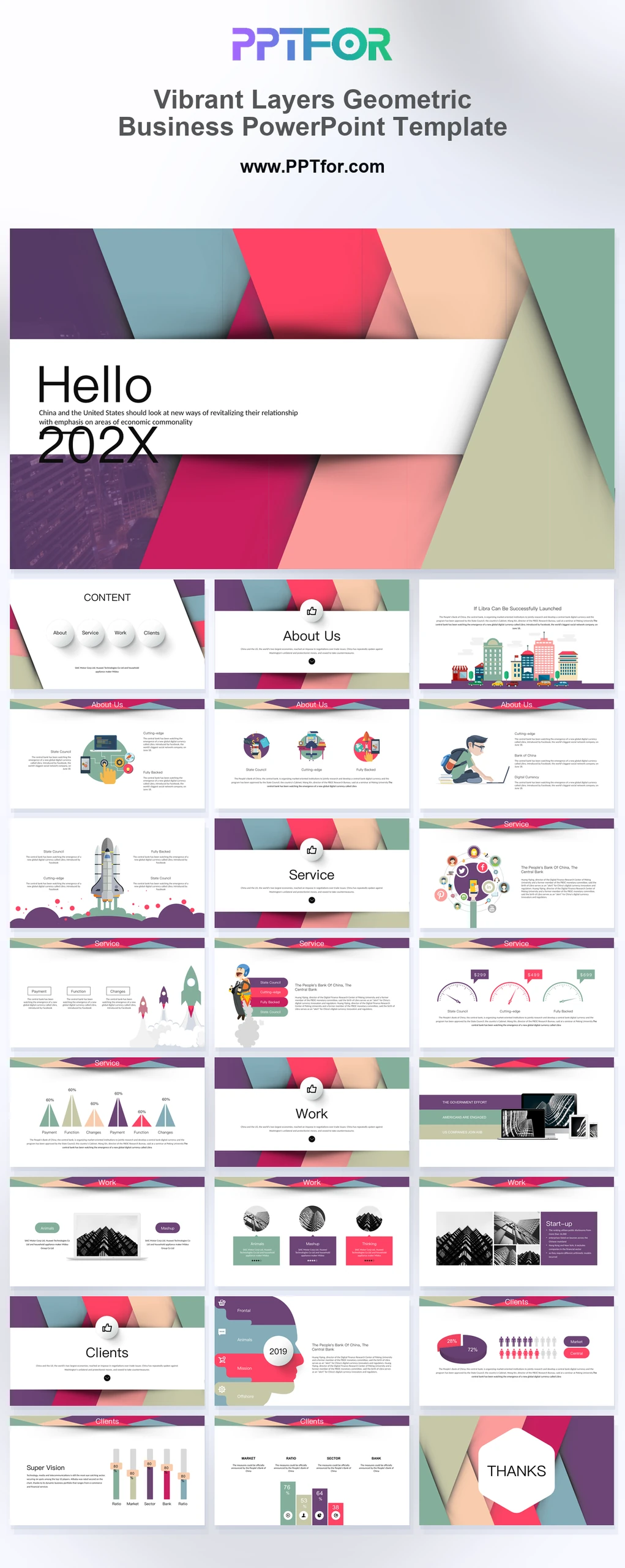
The Vibrant Layers Geometric Business PowerPoint Template offers 25 slides with layered shapes, milestones, gauges, and demographic graphics. Use it for a business presentation that explains progress through a small number of visual comparisons.

Visual elements include layered paper-cut geometry, diagonal material stripes, soft shadows, 3D orb menu nodes, flat business illustrations, and dark-framed device mockups.

  • Compatibility: Microsoft PowerPoint. Check fonts, charts, and image placement after importing into Google Slides or Keynote.
  • Aspect Ratio: 16:9 widescreen
  • Graphics: Editable vector graphics
  • Placeholders: Drag-and-Drop Placeholders
  • Editability: Editable text, colors, fonts, and layouts
  • Slide Count: 25 slides

Suggested Uses and Presentation Tasks

  • Startup founders pitching investors – use rocket milestones, device mockups, and geometric section flow to explain traction, launch plans, and funding context.
  • Creative directors presenting launch proposals – turn paper-cut layers, cityscape visuals, and flat illustrations into a more memorable project story.
  • Marketing managers building campaign decks – organize brand strategy, audience data, and speedometer gauges for clearer stakeholder discussion.
  • Brand strategists creating company profiles – use badge transitions, service sections, and client layouts to frame positioning and capability strengths.
  • Project coordinators preparing planning updates – combine astronaut progression, mountain charts, and process visuals to communicate milestones and next steps.
  • Educational venture teams introducing new programs – use playful business illustrations and demographic charts to explain learning goals and audience fit.
  • E-commerce teams pitching digital experiences – present interface mockups, campaign concepts, and brand assets in a colorful investor-ready format.

Frequently Asked Questions

When should I choose this template?

Choose this deck when a colorful geometric style suits a project or product update. Give gauges a defined scale and use labels to distinguish measured performance from illustrative progress symbols.

What should I prepare before editing?

Prepare milestone dates, progress definitions, comparison values, and audience categories. Explain the denominator for percentages and verify that decorative icons are not being presented as measured quantities.

What layouts are included in this 25-slide business pitch deck?

The deck includes a material layered cover, floating orb contents, badge transitions, cityscape feature slide, rocket milestones, astronaut progression, speedometer gauges, mountain charts, device mockups, brain profile infographic, demographic people charts, and a hexagonal closing slide.

How can I edit the template?

Edit the text, colors, and slide elements to match your presentation. Before updating a graphic, check whether it is a native chart, a grouped shape, or an image; the editing method differs.



Post a Comment

$12

$

  • Price is in US dollars and excludes tax
  • Size:16x9
  • Microsoft PowerPoint, Google Slides, Apple Keynote, PowerPoint for Mac / Office 365, WPS Office
  • 100% editable
  • What you see is what you get
  • This is a secure SSL encrypted payment. Credit Card Certificate

Get all products for only $29!

Get full access to our entire collection of premium PPT templates for one simple price.
Forget about complex tools or technical skills—just choose, edit, and download.