Avatar

Premium Cyber Violet AI Tech Annual Report Template

by PPTFOR Editorial Team in Marketing & Sales

Premium Cyber Violet AI Tech Annual Report Template

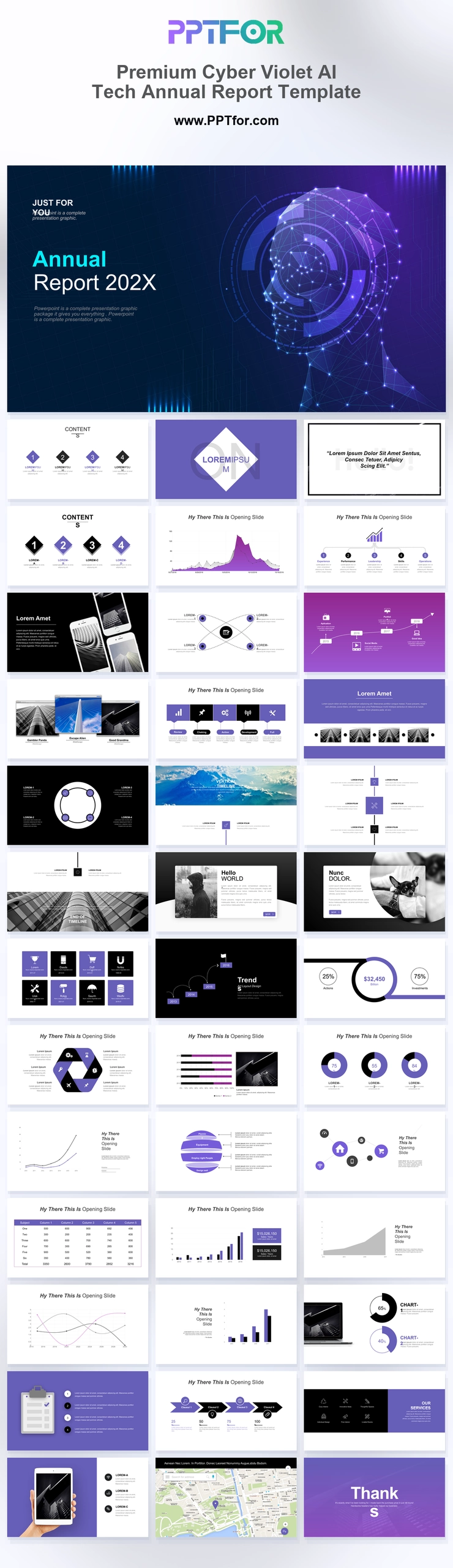
The Cyber Violet AI Tech Annual Report Template provides 36 slides with network imagery, process maps, comparison tables, and device mockups. Use it for a technology business review that explains product activity and annual performance.

Visual elements include a glowing digital network human head mesh profile, vertical neon lines, violet gradient panels, multi-phone clusters, and analytical area charts.

  • Compatibility: Microsoft PowerPoint. Check fonts, charts, and image placement after importing into Google Slides or Keynote.
  • Aspect Ratio: 16:9 widescreen
  • Graphics: Editable vector graphics
  • Placeholders: Drag-and-Drop Placeholders
  • Editability: Editable text, colors, fonts, and layouts
  • Slide Count: 36 slides

Suggested Uses and Presentation Tasks

  • CTOs presenting annual corporate reports – summarize technology priorities, system performance, and strategic roadmap updates with a futuristic executive structure.
  • Tech founders preparing investor pitch decks – connect product vision, traction, device experiences, and AI market positioning in a high-impact visual flow.
  • Data analysts explaining performance indicators – use area charts, process node maps, and comparison tables to make trend analysis easier to review.
  • Creative producers rolling out brand strategy – pair violet gradient panels, neon accents, and architectural hero layouts for a stronger high-tech identity.
  • Marketing directors launching AI product proposals – present service grids, device mockups, competency diagrams, and city map geolocation with campaign context.
  • Cybersecurity firms delivering audit presentations – organize system findings, risk themes, and action priorities through structured technical slide layouts.
  • Digital transformation consultants pitching enterprise change – use network visuals, process maps, and mockup slides to explain infrastructure modernization plans.

Frequently Asked Questions

When should I choose this template?

Choose this deck when its AI and network imagery matches the organization’s work. Describe specific technical capabilities and deployment status rather than using AI terminology as a substitute for product detail.

What should I prepare before editing?

Prepare the reporting period, product releases, usage or operating metrics, and supported capability claims. Label demonstrations, estimates, and planned features separately from deployed functionality.

What layouts are included in this 36-slide technology report deck?

The deck includes a network head cover, contents agenda, violet area charts, process node maps, smartphone clusters, service grids, architectural hero panels, competency diagrams, comparison tables, laptop mockups, tablet layouts, city map geolocation, and a Thank You slide.

How can I edit the template?

Edit the text, colors, and slide elements to match your presentation. Before updating a graphic, check whether it is a native chart, a grouped shape, or an image; the editing method differs.



Post a Comment

$15

$

  • Price is in US dollars and excludes tax
  • Size:16x9
  • Microsoft PowerPoint, Google Slides, Apple Keynote, PowerPoint for Mac / Office 365, WPS Office
  • 100% editable
  • What you see is what you get
  • This is a secure SSL encrypted payment. Credit Card Certificate

Get all products for only $29!

Get full access to our entire collection of premium PPT templates for one simple price.
Forget about complex tools or technical skills—just choose, edit, and download.