Avatar

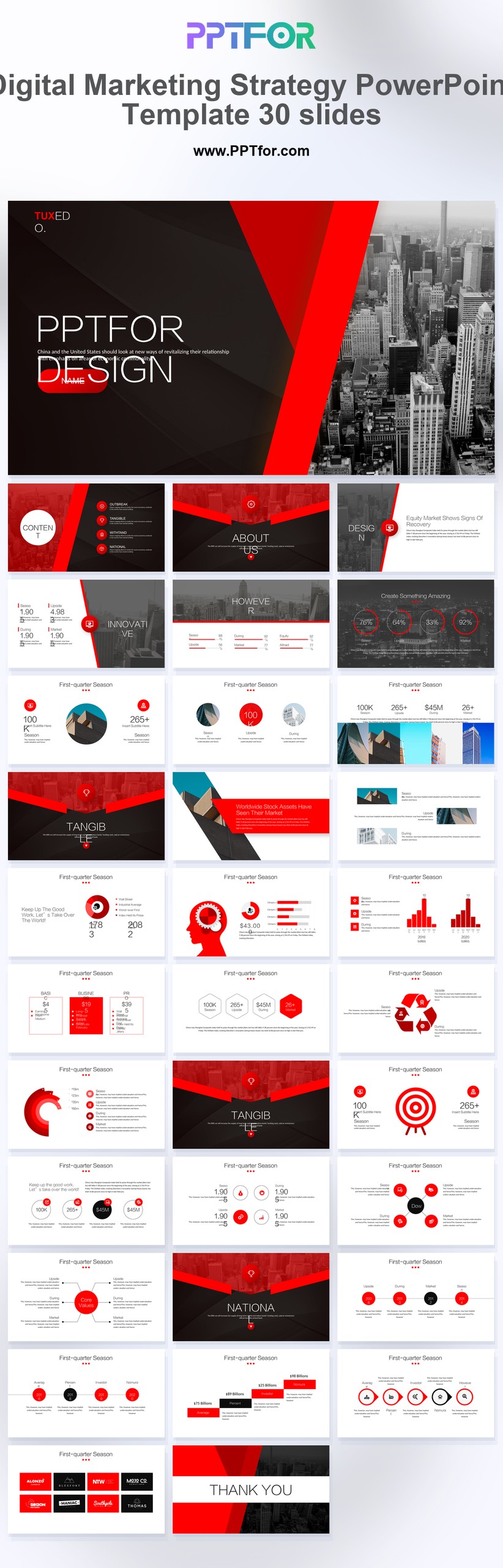
Digital Marketing Strategy PowerPoint Template 30 Slides

by PPTFOR Editorial Team in Marketing & Sales

Digital Marketing Strategy PowerPoint Template 30 Slides

The Digital Marketing Strategy PowerPoint Template provides 30 slides for presenting a marketing plan. Connect the target audience and campaign objective to channel choices, budget priorities, measurement, and the proposed sequence of work.

  • Compatibility: Microsoft PowerPoint. Check fonts, charts, and image placement after importing into Google Slides or Keynote.
  • Aspect Ratio: 16:9 widescreen
  • Graphics: Editable vector graphics
  • Placeholders: Drag-and-Drop Placeholders
  • Editability: Editable text, colors, fonts, and layouts
  • Slide Count: 30 slides

Suggested Content to Add

  • Business goal – define the result the marketing plan is expected to support.
  • Audience – identify customer segments, needs, and evidence behind the targeting.
  • Message and offer – explain the proposition and action requested from the audience.
  • Channel choices – justify the mix using audience behavior and past performance.
  • Budget and resources – show the assumptions and constraints behind the allocation.
  • Execution schedule – connect activity to owners, milestones, and approval dates.
  • Measurement – define a baseline, target, and review date for each success measure.

Frequently Asked Questions

How can I edit the template?

Edit the text, colors, and slide elements to match your presentation. Before updating a graphic, check whether it is a native chart, a grouped shape, or an image; the editing method differs.

What should I check when importing into other presentation software?

Use PowerPoint for the PPTX workflow. If you import the file into Google Slides or Keynote, review fonts, chart labels, image crops, and spacing before presenting. Imported layouts may need adjustment.

When should I choose this template?

Choose this strategy deck before launching or reallocating a campaign. Use performance evidence to justify channel choices, while keeping the detailed results of previous campaigns in supporting slides.

What should I prepare before editing?

Prepare audience segments, channel evidence, budget limits, campaign milestones, and success measures. Include the baseline and target for each KPI so the plan can be evaluated after launch.



Post a Comment

$15

$

  • Price is in US dollars and excludes tax
  • Size:16x9
  • Microsoft PowerPoint, Google Slides, Apple Keynote, PowerPoint for Mac / Office 365, WPS Office
  • 100% editable
  • What you see is what you get
  • This is a secure SSL encrypted payment. Credit Card Certificate

Get all products for only $29!

Get full access to our entire collection of premium PPT templates for one simple price.
Forget about complex tools or technical skills—just choose, edit, and download.