Avatar

Company Profile Corporate Annual Report Template

by PPTFOR Editorial Team in Business & Corporate

Company Profile Corporate Annual Report Template

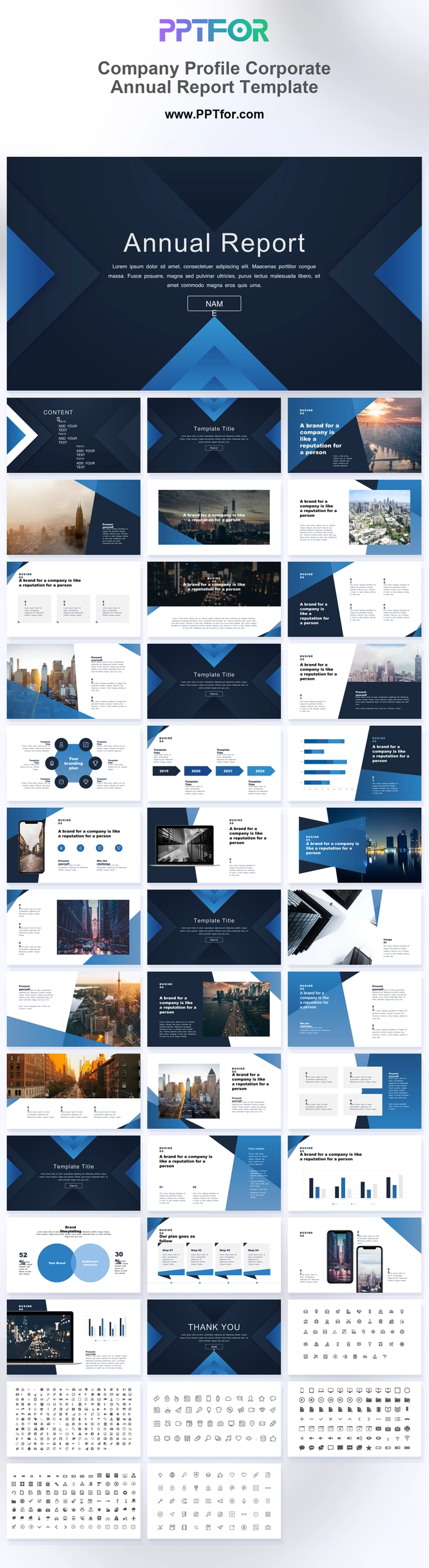
The Company Profile Corporate Annual Report Template combines a company introduction with annual-report layouts. Mission, city imagery, timelines, charts, and workflow slides help introduce the organization before explaining its progress.

Visual elements include sharp overlapping triangular layers, blue gradient chevron accents, architectural photography, minimalist data charts, and dual smartphone and laptop frames.

  • Compatibility: Microsoft PowerPoint. Check fonts, charts, and image placement after importing into Google Slides or Keynote.
  • Aspect Ratio: 16:9 widescreen
  • Graphics: Editable vector graphics
  • Placeholders: Drag-and-Drop Placeholders
  • Editability: Editable text, colors, fonts, and layouts
  • Slide Count: 36 slides (plus 3 vector icon sheets)

Suggested Uses and Presentation Tasks

  • Operations directors presenting annual business reports – organize performance updates, process timelines, and executive priorities for leadership review.
  • Financial analysts preparing quarterly corporate reviews – use row bar charts, comparison charts, and dashboard mockups to explain business performance clearly.
  • Marketing managers building company capability profiles – combine city photography grids, mission layouts, and icon sheets to frame brand strengths and service value.
  • CEOs leading investor pitch decks – present corporate vision, growth logic, and strategic roadmap topics with a executive structure.
  • Corporate strategy consultants writing executive proposals – use Venn diagrams, chevron workflows, and section breaks to make recommendations easier to compare.
  • Technology enterprises showcasing product direction – present smartphone frames, laptop dashboard mockups, and app-focused layouts for stakeholder discussions.
  • Real estate and finance teams reporting portfolio progress – pair architectural photography with data charts and comparison layouts for boardroom-ready updates.

Frequently Asked Questions

When should I choose this template?

Choose this hybrid format when external stakeholders need context about the company as well as its results. Keep enduring company facts separate from figures that apply only to the reporting year.

What should I prepare before editing?

Prepare a current company description, approved images, annual metrics, prior-year comparisons, and milestone dates. Confirm whether the listed icon sheets are additional to the presentation slides in your selected file.

What layouts are included in this Company Profile Corporate Annual Report Template?

The deck includes an annual report cover, contents outline, section title breaks, mission and quote layouts, city photography grids, timelines, bar charts, smartphone and laptop mockups, comparison charts, a Venn diagram, chevron workflows, and 3 vector icon grids.

How can I edit the template?

Edit the text, colors, and slide elements to match your presentation. Before updating a graphic, check whether it is a native chart, a grouped shape, or an image; the editing method differs.



Post a Comment

$15

$

  • Price is in US dollars and excludes tax
  • Size:16x9
  • Microsoft PowerPoint, Google Slides, Apple Keynote, PowerPoint for Mac / Office 365, WPS Office
  • 100% editable
  • What you see is what you get
  • This is a secure SSL encrypted payment. Credit Card Certificate

Get all products for only $29!

Get full access to our entire collection of premium PPT templates for one simple price.
Forget about complex tools or technical skills—just choose, edit, and download.