Avatar

Dynamic 3D Fluid Ribbon Wave Creative Strategy Template

by PPTFOR Editorial Team in Creative & Portfolio

Dynamic 3D Fluid Ribbon Wave Creative Strategy Template

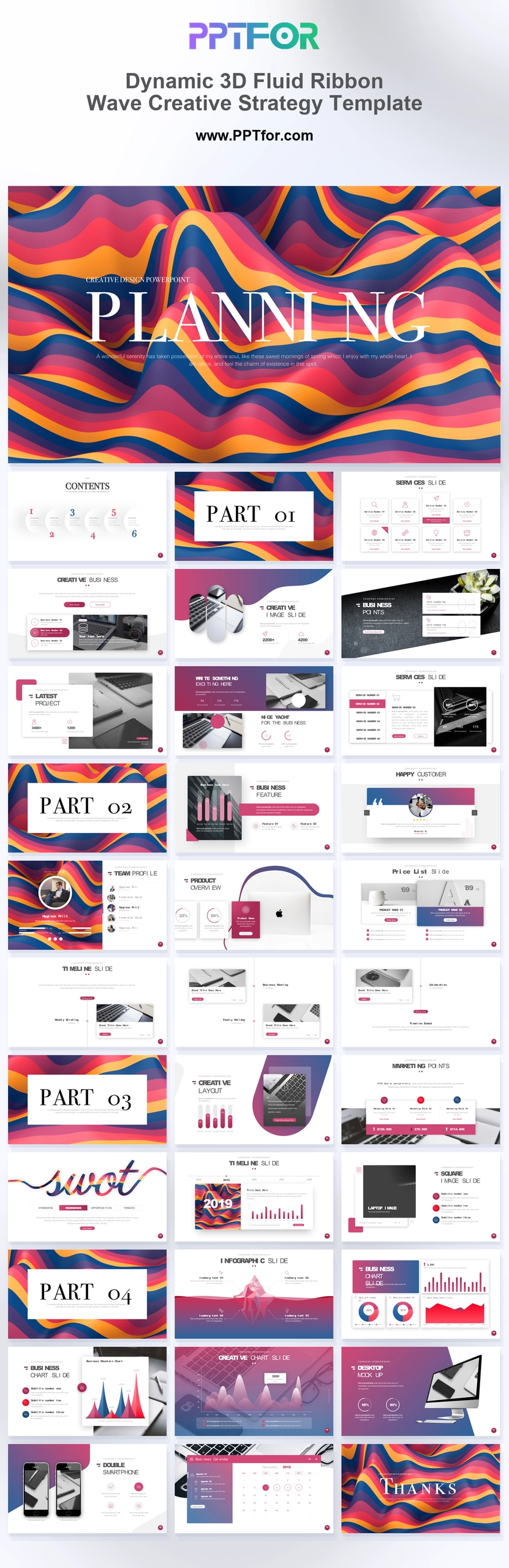
The 3D Fluid Ribbon Wave Creative Strategy Template provides 34 slides for service proposals and creative strategy presentations. Portfolio, team, ecosystem, pricing, timeline, and SWOT layouts support a proposal from context through delivery.

Visual elements include 3D fluid wave backgrounds, colorful ribbon textures, script typography accents, white content backdrops, phone mockups, desktop showcases, iceberg infographics, and overlapping photo windows.

  • Compatibility: Microsoft PowerPoint. Check fonts, charts, and image placement after importing into Google Slides or Keynote.
  • Aspect Ratio: 16:9 widescreen
  • Graphics: Editable vector graphics
  • Placeholders: Drag-and-Drop Placeholders
  • Editability: Editable text, colors, fonts, and layouts
  • Slide Count: 34 slides

Suggested Uses and Presentation Tasks

  • Creative directors shaping business strategy – use fluid covers, service overviews, and gallery layouts to present a more distinctive creative direction.
  • Marketing managers rolling out campaigns – organize timelines, SWOT analysis, feature matrices, and testimonials into a stronger campaign presentation flow.
  • Brand consultants preparing launch proposals – combine ribbon textures, photo windows, and product ecosystem slides to explain brand positioning with more energy.
  • PR specialists presenting event concepts – use project showcases, image grids, and desktop mockups to frame public-facing ideas for stakeholder approval.
  • Startup founders pitching app concepts – present dual phone mockups, pricing tables, and strategy sections in a launch-ready deck.
  • Fashion branding teams building trend forecasts – pair vivid magenta, indigo, orange, and yellow accents with layered visuals for a seasonal story.
  • Event planners developing sponsor proposals – use testimonials, service matrices, milestones, and visual showcases to communicate event value quickly.

Frequently Asked Questions

When should I choose this template?

Choose this deck when a strategy proposal needs to show creative work as well as explain it. Use the imagery to demonstrate the proposed direction and the timeline to define the work involved.

What should I prepare before editing?

Prepare the brief, approved examples, service scope, team roles, pricing assumptions, and delivery schedule. Explain the criteria used to compare strategic options and select the recommendation.

What layouts are included in this 34-slide creative strategy deck?

The deck includes a 3D fluid cover, contents, section dividers, service overview, business backgrounder, gallery slides, project showcase, feature matrix, testimonials, team profile canvas, product ecosystem overview, pricing table, timeline, SWOT analysis, image grid, iceberg infographic, phone mockups, desktop showcase, and closing slide.

How can I edit the template?

Edit the text, colors, and slide elements to match your presentation. Before updating a graphic, check whether it is a native chart, a grouped shape, or an image; the editing method differs.



Post a Comment

$15

$

  • Price is in US dollars and excludes tax
  • Size:16x9
  • Microsoft PowerPoint, Google Slides, Apple Keynote, PowerPoint for Mac / Office 365, WPS Office
  • 100% editable
  • What you see is what you get
  • This is a secure SSL encrypted payment. Credit Card Certificate

Get all products for only $29!

Get full access to our entire collection of premium PPT templates for one simple price.
Forget about complex tools or technical skills—just choose, edit, and download.