Avatar

Royal Blue & Black Business Plan PowerPoint Template

by PPTFOR Editorial Team in Business & Corporate

Royal Blue & Black Business Plan PowerPoint Template

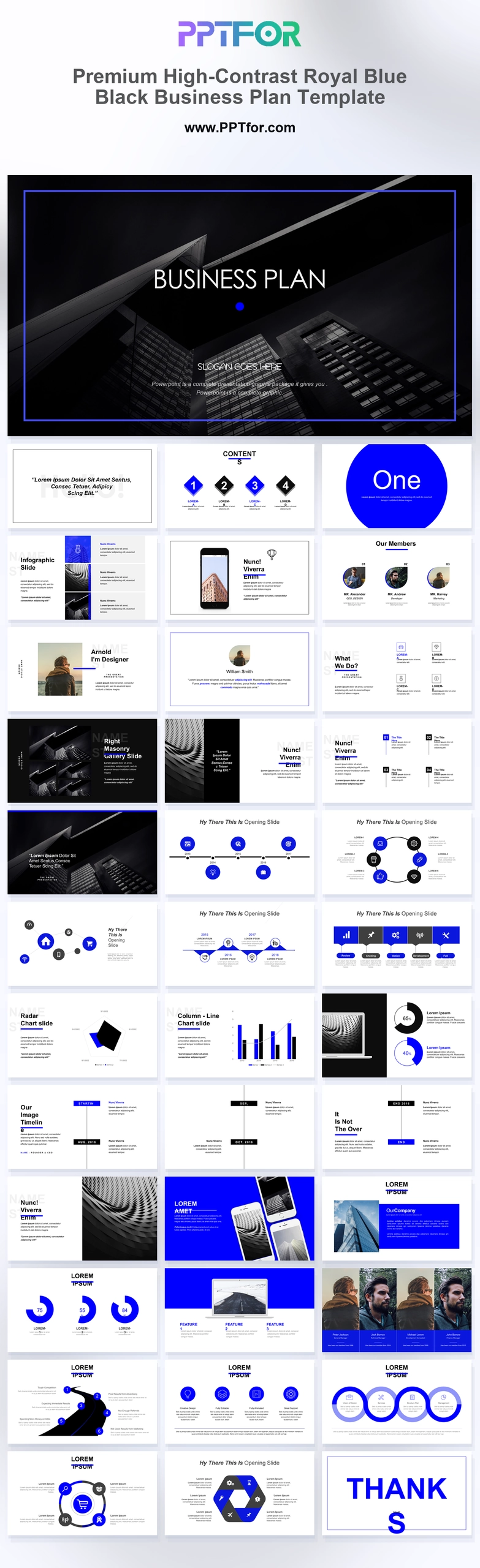
The Royal Blue and Black Business Plan PowerPoint Template offers 37 slides for a business proposal. Vision, portfolio, timeline, comparison, roadmap, and strategic-matrix layouts support a plan with visual examples and an execution sequence.

Visual elements include dramatic architectural photography overlays, sapphire blue geometric circles, structural grid text blocks, device mockups, curvilinear roadmaps, and radar charts.

  • Compatibility: Microsoft PowerPoint. Check fonts, charts, and image placement after importing into Google Slides or Keynote.
  • Aspect Ratio: 16:9 widescreen
  • Graphics: Editable vector graphics
  • Placeholders: Drag-and-Drop Placeholders
  • Editability: Editable text, colors, fonts, and layouts
  • Slide Count: 37 slides

Suggested Uses and Presentation Tasks

  • CEOs presenting corporate business plans – organize vision, market positioning, strategy, and execution priorities for executive-level discussion.
  • Managing directors preparing strategic partnership reviews – use comparison columns, process loops, and roadmap slides to frame collaboration opportunities.
  • Venture capitalists building investor pitch decks – present business logic, growth direction, and financial technology opportunities with a corporate structure.
  • Principal architects pitching real estate projects – combine architectural photography, portfolio galleries, map pins, and proposal layouts for location-led storytelling.
  • Senior strategy consultants shaping luxury brand positioning – use high-contrast grids, blue accent circles, and executive layouts to explain the business proposition.
  • Fintech teams explaining product strategy – use device mockups, radar charts, and milestone timelines to connect technology value with business outcomes.
  • Corporate enterprises reviewing multi-year plans – turn curvilinear roadmaps, strategic matrices, and board profiles into clearer leadership presentations.

Frequently Asked Questions

When should I choose this template?

Choose this version when a plan needs both business analysis and product or project imagery. Select a main sequence around the decision, with comparison and financial detail available for questions.

What should I prepare before editing?

Prepare the proposed offer, market evidence, operating stages, resource needs, and approved project images. Make the assumptions behind comparisons and forecasts visible to reviewers.

What layouts are included in this 37-slide business plan deck?

The deck includes an architectural cover, vision statement, numeric table of contents, section divider, smartphone and laptop mockups, board member profiles, portfolio gallery, chevron timeline, radar chart, comparison columns, curvilinear roadmap, map pins, process loops, strategic matrix, and closing slide.

How can I edit the template?

Edit the text, colors, and slide elements to match your presentation. Before updating a graphic, check whether it is a native chart, a grouped shape, or an image; the editing method differs.



Post a Comment

$15

$

  • Price is in US dollars and excludes tax
  • Size:16x9
  • Microsoft PowerPoint, Google Slides, Apple Keynote, PowerPoint for Mac / Office 365, WPS Office
  • 100% editable
  • What you see is what you get
  • This is a secure SSL encrypted payment. Credit Card Certificate

Get all products for only $29!

Get full access to our entire collection of premium PPT templates for one simple price.
Forget about complex tools or technical skills—just choose, edit, and download.