Avatar

Friendly Teal Flat Illustration Team Collaboration Template

by PPTFOR Editorial Team in Creative & Portfolio

Friendly Teal Flat Illustration Team Collaboration Template

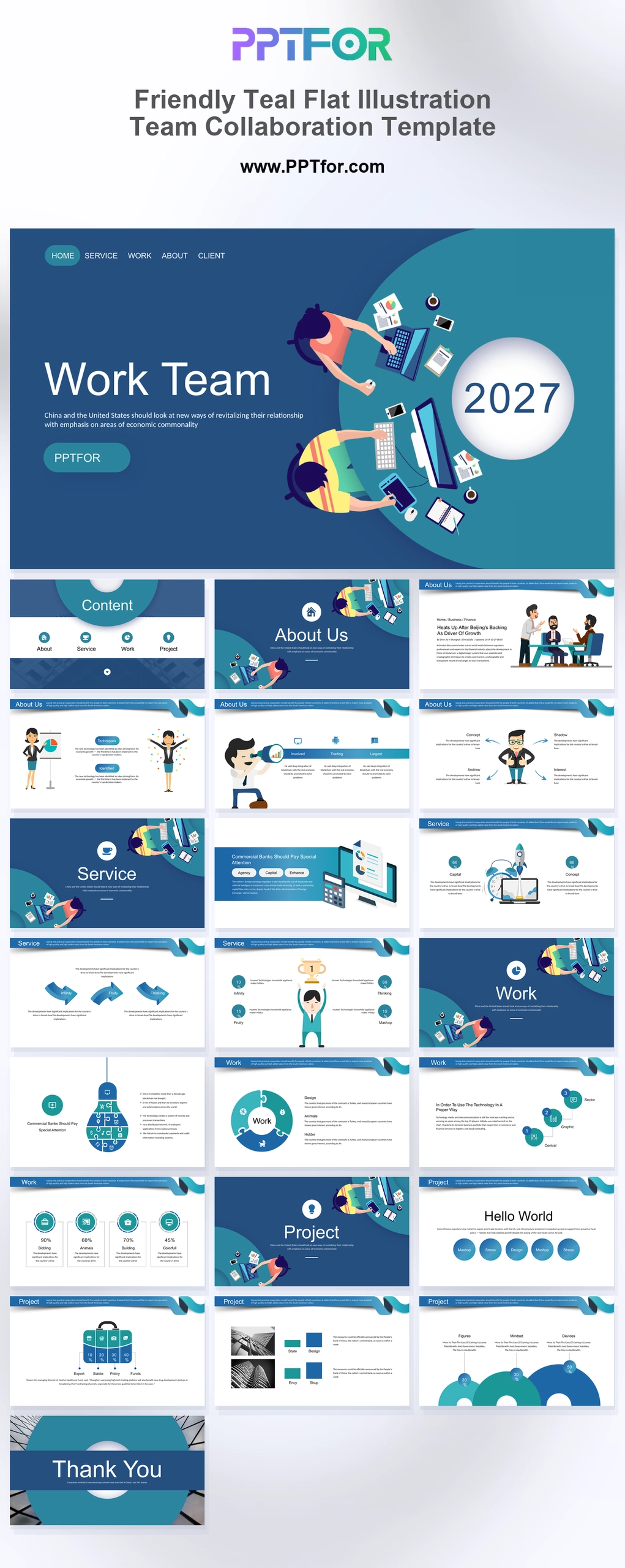
The Friendly Teal Flat Illustration Team Collaboration Template offers 23 slides for explaining a team initiative. Mission, strategy, service, metrics, and process layouts connect the shared objective to the work required from the team.

Visual elements include top-down collaboration illustrations, ocean-blue header banners, flat business characters, lightbulb jigsaw diagrams, crescent data gauges, hand-drawn vector icons, and crisp white space.

  • Compatibility: Microsoft PowerPoint. Check fonts, charts, and image placement after importing into Google Slides or Keynote.
  • Aspect Ratio: 16:9 widescreen
  • Graphics: Editable vector graphics
  • Placeholders: Drag-and-Drop Placeholders
  • Editability: Editable text, colors, fonts, and layouts
  • Slide Count: 23 slides

Suggested Uses and Presentation Tasks

  • HR managers leading culture onboarding – introduce mission, team expectations, and company values with approachable illustrated business slides.
  • Project managers launching kickoff presentations – use strategy tables, process loops, and project showcases to align teams before execution begins.
  • Corporate trainers running team workshops – explain collaboration models, service structures, and capability milestones with friendly vector visuals.
  • Team leaders preparing cross-departmental reviews – organize metrics, performance gauges, and footprint comparisons for clearer internal discussion.
  • Agile coaches mapping team processes – use jigsaw diagrams, brainstorming puzzles, and milestone graphics to guide planning conversations.
  • Marketing coordinators presenting quarterly updates – connect market opportunity profiles, launch concepts, and performance grids in one clean deck.
  • Education technology teams explaining programs – combine cartoon characters, hand-drawn icons, and white-space layouts for more engaging learning presentations.

Frequently Asked Questions

When should I choose this template?

Choose this deck for a collaborative planning discussion where roles and handoffs need clarification. Use the illustrations to introduce the topic and the process layouts to show actual responsibilities.

What should I prepare before editing?

Prepare the shared objective, team roles, deliverables, dependencies, and success measures. Record the decisions needed from the meeting and assign an owner to each agreed next step.

What layouts are included in this 23-slide collaboration deck?

The deck includes a collaborative cover, icon-driven contents, mission statement, strategy table, market opportunity profile, metrics grid, service matrix, rocket concept, trophy milestones, lightbulb puzzle, jigsaw process loop, footprint comparison, performance gauge, project showcases, and closing canvas.

How can I edit the template?

Edit the text, colors, and slide elements to match your presentation. Before updating a graphic, check whether it is a native chart, a grouped shape, or an image; the editing method differs.



Post a Comment

$0

$

  • Price is in US dollars and excludes tax
  • Size:16x9
  • Microsoft PowerPoint, Google Slides, Apple Keynote, PowerPoint for Mac / Office 365, WPS Office
  • 100% editable
  • What you see is what you get
  • This is a secure SSL encrypted payment. Credit Card Certificate

Get all products for only $29!

Get full access to our entire collection of premium PPT templates for one simple price.
Forget about complex tools or technical skills—just choose, edit, and download.