Get full access to premium PowerPoint templates at a limited-time price.Get Now
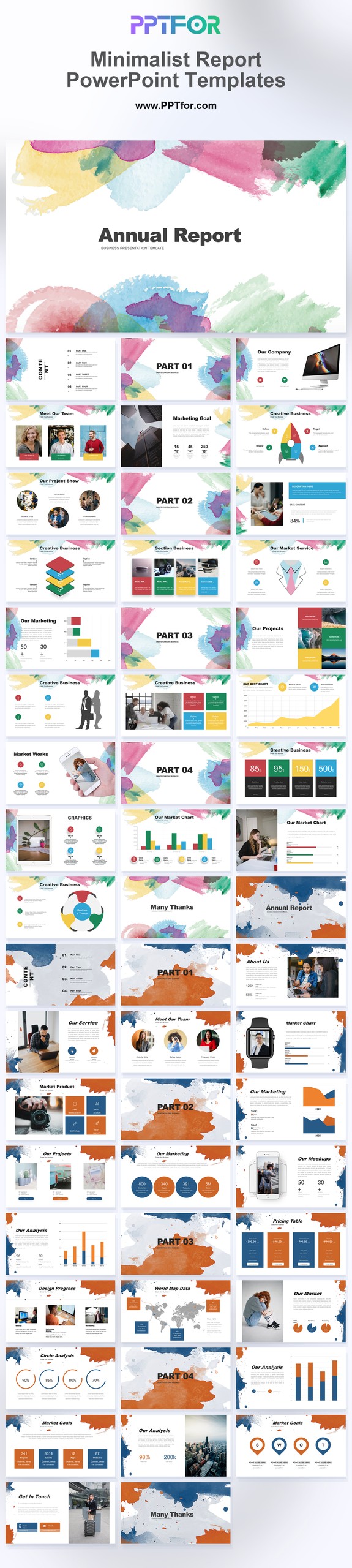
The Minimalist Report PowerPoint Template is designed for business reviews and client updates where the findings need more attention than the decoration. Use its restrained layouts for short summaries, a small number of metrics, and clear next steps.
| Reporting need | Recommended content | Useful companion |
|---|---|---|
| Executive business review | Summary, KPI trend, variance, risks, decisions, and next-period priorities | Business Report templates |
| Marketing performance report | Objectives, channel results, campaign analysis, budget, insights, and recommendations | Marketing Report Template PowerPoint guide |
| Project status update | RAG health, milestones, timeline, risks, requested decisions, and next steps | Project Status Report guide |
| Year-end stakeholder report | Annual highlights, financial or operating results, milestones, lessons, and outlook | Annual Report templates |
Before editing: Use the table above as a suggested reporting outline. Populate it with your own figures, sources, and decisions; the presentation template does not generate the analysis for you.
Choose this template for a recurring executive report that readers need to scan quickly. Keep detailed calculations in an appendix and reserve the main slides for changes, implications, and decisions.
Edit the text, colors, and slide elements to match your presentation. Before updating a graphic, check whether it is a native chart, a grouped shape, or an image; the editing method differs.
Use PowerPoint for the PPTX workflow. If you import the file into Google Slides or Keynote, review fonts, chart labels, image crops, and spacing before presenting. Imported layouts may need adjustment.
Prepare the reporting period, three to five headline findings, supporting figures, and named action owners. Keep chart scales and metric definitions consistent when reusing the report next month or quarter.

Get full access to our entire collection of premium PPT templates for one simple price.
Forget about complex tools or technical skills—just choose, edit, and download.