Avatar

Ultimate Yellow Charcoal Creative Infographic Presentation Elements

by pptfor in Creative & Portfolio

Ultimate Yellow Charcoal Creative Infographic Presentation Elements

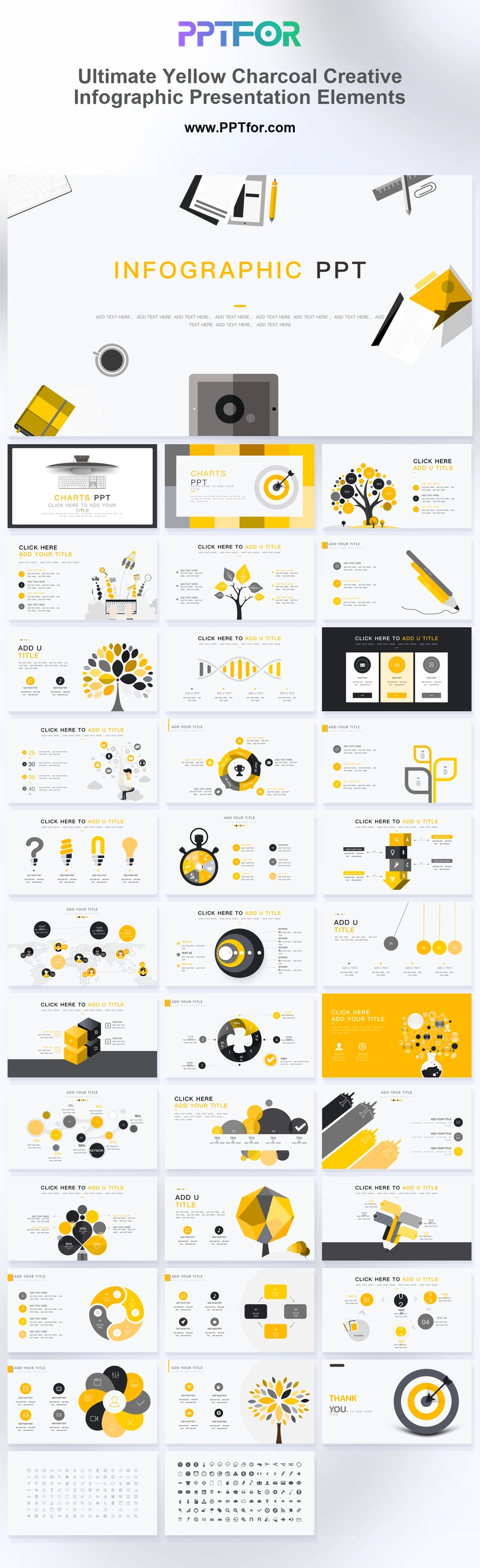
Use these Ultimate Yellow and Charcoal Creative Infographic Presentation Elements for data visualization, roadmapping, and training in 36 slides.

The Ultimate Yellow and Charcoal Creative Infographic Presentation Elements give business analysts, project managers, marketing strategists, corporate trainers, and creative leads a 36-slide system for complex data visualization, strategic roadmapping, competency analysis, training workshops, and milestone tracking. Flat growth data trees, golden DNA strand models, target bullseye graphics, circular pie loops, pendulum nodes, puzzle steps, and lightbulb frameworks create a clean flat-design language for management consulting, digital agencies, education technology, financial asset research, and technology startups. The Vibrant Yellow, Deep Charcoal, Soft Gray, and Minimalist White palette supports attention, authority, structure, and readable contrast across bullseye overviews, data tree networks, feature matrices, system loops, time metrics, funnels, hexagonal crystals, world maps, stacked steps, flower process nodes, and micro-icons. Template compatibility includes Microsoft PowerPoint, Google Slides, and Apple Keynote, with editable vector shapes, iconography, drag-and-drop placeholders, and customizable slides, colors, fonts, and layouts. Customize these elements now and turn dense business logic into cleaner visual decision slides.

  • Compatibility: Microsoft PowerPoint, Google Slides, Apple Keynote
  • Aspect Ratio: 16:9 widescreen
  • Graphics: 100% Vector Graphics
  • Placeholders: Drag-and-Drop Placeholders
  • Editability: Fully customizable slides, colors, fonts, and layouts
  • Slide Count: 36 slides

What You Can Use This Ultimate Yellow and Charcoal Creative Infographic Presentation Elements For

  • Business analysts visualizing complex data – use data trees, pie loops, funnels, and world maps to turn research findings into clearer business summaries.
  • Project managers tracking milestone progress – structure timelines, stacked steps, and process nodes for more focused project update meetings.
  • Marketing strategists building roadmap presentations – connect lightbulb frameworks, target bullseyes, and feature matrices into a practical strategic narrative.
  • Corporate trainers leading workshop sessions – use question funnels, micro-icons, and comparison layouts to explain learning paths and decision logic.
  • Creative leads presenting campaign concepts – combine yellow accents, charcoal structure, and abstract metaphors for sharper idea development slides.
  • Financial asset researchers comparing allocation models – use DNA strand models, three-column matrices, and metric layouts to present asset logic with better organization.
  • Technology startups explaining competency maps – present system loops, hexagonal structures, and target slides to clarify team strengths and growth priorities.

Frequently Asked Questions

What are these yellow and charcoal infographic presentation elements best used for?

These elements are best used for data visualization, strategic roadmapping, competency analysis, training workshops, and project milestone tracking when teams need functional business slides with a clean flat-design look.

Which teams can use this Ultimate Yellow and Charcoal Creative Infographic Presentation Elements deck?

Business analysts, project managers, marketing strategists, corporate trainers, creative leads, consultants, financial researchers, and startup teams can use this 36-slide deck to explain data, workflows, priorities, and business logic.

What infographic layouts are included in this 36-slide template?

The deck includes target bullseyes, data tree networks, keyboard rockets, DNA allocation models, feature matrices, system loops, time metrics, question funnels, hexagonal crystals, world maps, stacked steps, flower process nodes, and a micro-icon pack.

Can I customize the colors and infographic shapes?

Yes. The template works with Microsoft PowerPoint, Google Slides, and Apple Keynote, with 100% vector graphics, editable iconography, drag-and-drop placeholders, rapid color theme switching, and customizable slides, colors, fonts, and layouts.


Post a Comment

$15

$

  • Price is in US dollars and excludes tax
  • Size:16x9
  • Microsoft PowerPoint, Google Slides, Apple Keynote, PowerPoint for Mac / Office 365, WPS Office
  • 100% editable
  • What you see is what you get
  • This is a secure SSL encrypted payment. Credit Card Certificate

Get all products for only $29!

Get full access to our entire collection of premium PPT templates for one simple price.
Forget about complex tools or technical skills—just choose, edit, and download.