Avatar

SWOT Analysis PowerPoint Template 32 Slides

by pptfor in Creative & Portfolio

SWOT Analysis PowerPoint Template 32 Slides

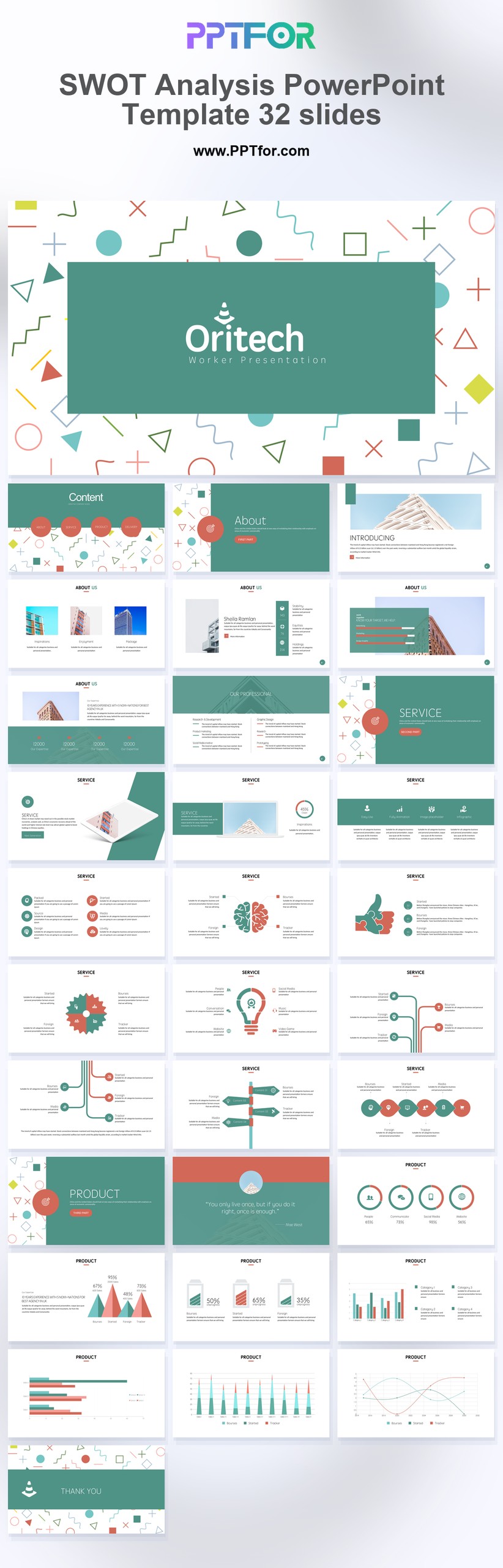
This SWOT Analysis PowerPoint Template is designed for smooth editing and dependable cross-platform use in Microsoft PowerPoint, Google Slides, and Apple Keynote. Template compatibility includes 100% Vector Graphics, Drag-and-Drop Placeholders, and fully customizable slides, colors, fonts, and layouts, giving teams a fast way to adapt each page for workshops, reviews, or executive meetings. The clean minimal design supports professional analysis without unnecessary visual noise, helping users build an executive summary that looks credible and saves valuable preparation time. Download this template now and create a sharper SWOT presentation with faster business clarity.

  • Compatibility: Microsoft PowerPoint, Google Slides, Apple Keynote
  • Aspect Ratio: 16:9 widescreen
  • Graphics: 100% Vector Graphics
  • Placeholders: Drag-and-Drop Placeholders
  • Editability: Fully customizable slides, colors, fonts, and layouts
  • Slide Count: 32 slides

What You Can Use This SWOT Analysis PowerPoint Template For

  • Strategy managers leading internal business reviews – present strengths, risks, and market opportunities in a format that improves stakeholder engagement and speeds up planning decisions.
  • Consultants building client assessment decks – turn complex findings into a polished executive summary that makes recommendations easier to understand and act on.
  • Startup founders evaluating market position – clarify business advantages, operational gaps, and growth threats to support a more focused strategic roadmap.
  • Marketing leaders reviewing brand performance – organize competitive pressure, internal capabilities, and expansion opportunities into a more decision-ready strategic presentation.
  • Project teams preparing workshop materials – guide structured SWOT sessions with cleaner layouts that improve participation and help capture clearer action points.
  • Executives comparing business scenarios – review multiple strategic options with better visual clarity, faster alignment, and more confident next-step planning.
  • Business analysts summarizing operational insights – communicate key risks and opportunities in a way that strengthens the value proposition behind proposed actions.

Frequently Asked Questions

Can I customize every slide in this SWOT analysis template?

Yes, every slide is fully editable. You can change text, colors, fonts, and layouts quickly, which helps teams adapt the template to different brands, departments, or business review formats without design complexity.

Is this SWOT Analysis PowerPoint Template compatible with Google Slides and Keynote?

Yes, the template works with Microsoft PowerPoint, Google Slides, and Apple Keynote. That compatibility makes it easier to edit, share, and present the same strategic deck across different teams and devices.

How does this template save time during strategic planning?

It saves time by giving you a ready-made structure for SWOT reviews, business assessments, and planning sessions. Drag-and-Drop Placeholders and editable layouts reduce formatting work and speed up presentation preparation.

What makes this SWOT presentation template look professional?

The professional quality comes from clean grids, strong hierarchy, and organized sections that keep strategic content readable. That structure helps teams present analysis with more clarity, confidence, and executive-level visual consistency.

Write a Review


Post a Comment

$15

$

  • Price is in US dollars and excludes tax
  • Size:16x9
  • PowerPoint MacOffice 365 Google Slides
  • 100% editable
  • What you see is what you get
  • This is a secure SSL encrypted payment. Credit Card Certificate
Avatar
pptfor Joined: April 2026
Item Rating:
This item no rated yet.

Get all products for only $29!

Get full access to our entire collection of premium PPT templates for one simple price.
Forget about complex tools or technical skills—just choose, edit, and download.