Avatar

Modern Yellow Gray Striped Geometric Presentation Template

by PPTFOR Editorial Team in Creative & Portfolio

Modern Yellow Gray Striped Geometric Presentation Template

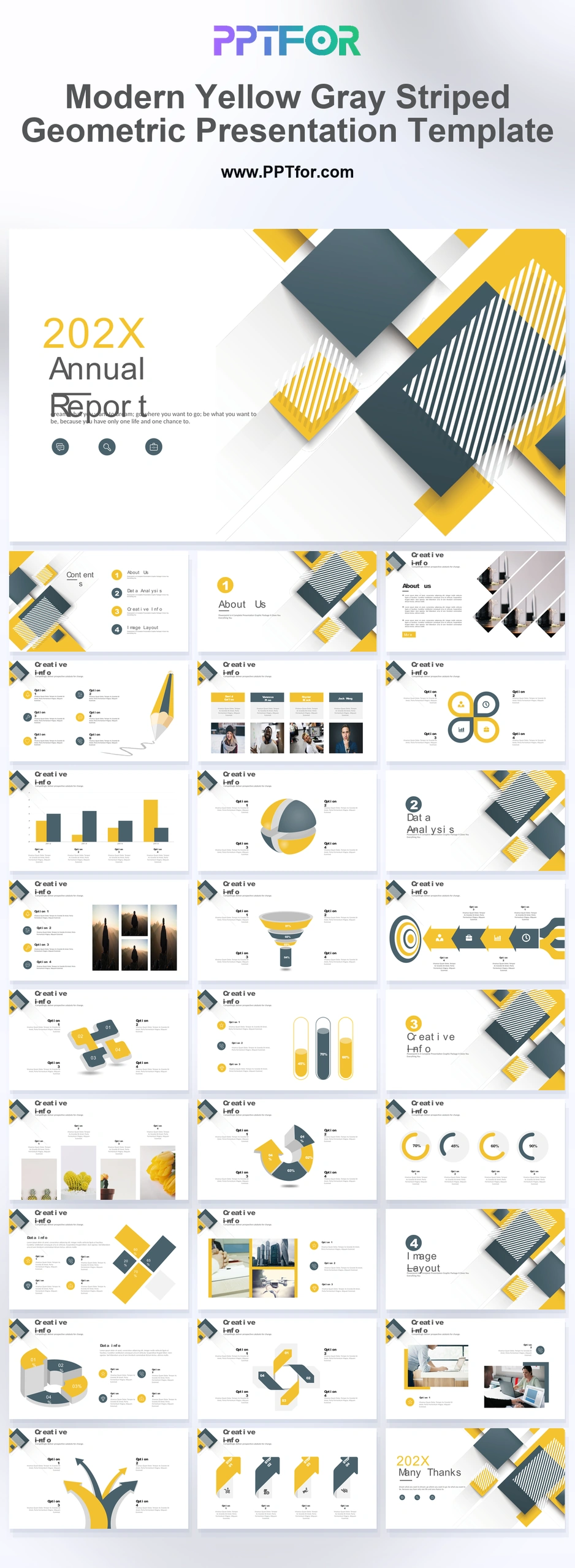
The Modern Yellow Gray Striped Geometric Presentation Template provides 27 slides for company and planning presentations. Corporate-history, team-skill, concept-path, chart, and gallery layouts combine organizational context with evidence and proposed work.

Visual elements include overlapping diagonal square tiles, bold zebra-striped texture fills, pencil sketch infodiagrams, test-tube data indicators, and multi-segmented strategy arrows.

  • Compatibility: Microsoft PowerPoint. Check fonts, charts, and image placement after importing into Google Slides or Keynote.
  • Aspect Ratio: 16:9 widescreen
  • Graphics: Editable vector graphics
  • Placeholders: Drag-and-Drop Placeholders
  • Editability: Editable text, colors, fonts, and layouts
  • Slide Count: 27 slides

Suggested Uses and Presentation Tasks

  • Project Manager preparing corporate annual reports – organize performance updates, strategy arrows, and stacked financial bar charts into a clearer executive review.
  • Principal Architect presenting design concepts – use the striped geometric cover, pencil-drawn concept path, and modular workplace photo galleries to frame spatial ideas with stronger visual order.
  • Academic Director reviewing research findings – structure methodology, data indicators, and section divider slides into a readable academic review deck.
  • Business Consultant validating a business model – combine multi-tier funnel charts, target bullseye strategy grids, and split-sphere data models to compare options using defined comparison criteria.
  • Operations Lead explaining project progress – turn team skills, corporate history, and 3D circular process loops into a practical update for internal stakeholders.
  • Civil engineering team building proposal bids – present timelines, team capability, strategy arrows, and workplace imagery in a structured deck suited to formal review.
  • Urban development team mapping strategic priorities – use multi-directional arrow confluences and quadrant diagrams to connect planning inputs with project decisions.

Frequently Asked Questions

When should I choose this template?

Choose this deck when a yellow-and-gray brand style suits a company update or proposal. Use the striped elements to separate sections and leave chart labels against a quiet background.

What should I prepare before editing?

Prepare company milestones, team capabilities, project images, and any financial or funnel data. Explain the basis of skill ratings and replace sample percentages with documented values.

What layouts and visual sections are included in this deck?

The deck includes a striped geometric cover, multi-level table of contents, section dividers, corporate history profile, team skill showcase, pencil-drawn concept path, clover diagram, financial bar charts, funnel charts, data bars, process loops, galleries, and closing slide.

How can I edit the template?

Edit the text, colors, and slide elements to match your presentation. Before updating a graphic, check whether it is a native chart, a grouped shape, or an image; the editing method differs.



Post a Comment

$15

$

  • Price is in US dollars and excludes tax
  • Size:16x9
  • Microsoft PowerPoint, Google Slides, Apple Keynote, PowerPoint for Mac / Office 365, WPS Office
  • 100% editable
  • What you see is what you get
  • This is a secure SSL encrypted payment. Credit Card Certificate

Get all products for only $29!

Get full access to our entire collection of premium PPT templates for one simple price.
Forget about complex tools or technical skills—just choose, edit, and download.